<?xml version="1.0" encoding="utf-8"?>
<feed xmlns="http://www.w3.org/2005/Atom">

 <title>igvita.com</title>
 <subtitle type="text">a goal is a dream with a deadline</subtitle>

 <link rel="self" type="application/atom+xml" href="https://www.igvita.com/atom.xml" />
 <link rel="alternate" type="text/html" href="https://www.igvita.com" />

 <updated>2021-01-28T13:43:26-08:00</updated>
 <id>https://www.igvita.com/</id>

 <author>
   <name>Ilya Grigorik</name>
   <uri>https://www.igvita.com/</uri>
   <email>ilya@igvita.com</email>
 </author>


 <entry>
   <title type="html"><![CDATA[Stop Cross-Site Timing Attacks with SameSite cookies]]></title>
   <link href="https://www.igvita.com/2016/08/26/stop-cross-site-timing-attacks-with-samesite-cookies/"/>
   <updated>2016-08-26T00:00:00-07:00</updated>
   <id>https://www.igvita.com/2016/08/26/stop-cross-site-timing-attacks-with-samesite-cookies/</id>
   <content type="html"><![CDATA[<p><img src='https://www.igvita.com/posts/16/passive-attack.png' class='left' style='max-width:300px;width:100%' /> Let's say we have a client that can initiate a network request for any URL on the web but the response is opaque and cannot be inspected. <strong>What could we learn about the client or the response?</strong> As it turns out, armed with a bit of patience and rudimentary statistics, "a lot".</p>

<p>For example, the duration of the fetch is a combination of network time of the request reaching the server, server processing time, and network time of the response. Each and every one of these steps "leaks" information both about the client and the server.</p>

<p>For example, if the total duration is very small (say, &lt;10ms) then we can reasonably intuit that we might be talking to a local cache, which means that the client has previously fetched this resource. Alternatively, if the duration is slightly higher (say, &lt;50ms) then we can reasonably guess that the client is on a low-latency network (e.g. fast 4G or WiFi). We can also append random data to the URL to make it unique and rule out the various HTTP caches along the way. From there, we can try making more requests to the server and observe how the fetch duration changes to infer change in server processing times and/or larger responses being sent to the client.</p>

<p>If we're really crafty, we can also use the properties of the network transport like CWND induced roundtrips in TCP (see <a href="https://hpbn.co/building-blocks-of-tcp/#slow-start">TCP Slow Start</a>), and other quirks of local network configuration, as additional signals to infer properties (e.g. size) of the response—see <a href="https://media.blackhat.com/eu-13/briefings/Beery/bh-eu-13-a-perfect-crime-beery-wp.pdf">TIME</a>, <a href="https://www.blackhat.com/docs/us-16/materials/us-16-VanGoethem-HEIST-HTTP-Encrypted-Information-Can-Be-Stolen-Through-TCP-Windows-wp.pdf">HEIST</a> attacks. If the response is compressed and also happens to reflect submitted data, then there is also the possibility of using a <a href="https://en.wikipedia.org/wiki/Oracle_attack">compression oracle attack</a> (see <a href="https://en.wikipedia.org/wiki/BREACH_(security_exploit)">BREACH</a>) to extract data from the response.</p>

<div class="callout">In theory, the client could try to stymie such attacks by making all operations take constant time, but realistically that's neither a practical nor an acceptable solution due to the user experience and performance implications of such strategy. Injecting random delays doesn't fare much better, as it carries similar implications.</div>


<h2>"Networking thermodynamics"</h2>

<p>Each and every step in the fetch process—from the client generating the request and putting on the wire, the network hops to the server, the server processing time, response properties, and the network hops back to the client—"leaks" information about the properties of the client, network, server, and the response. This is not a bug; it's a fact of life. Borrowing an explanation from our physicist friends: <strong>putting a system to work amounts to extracting energy from it, which we can then measure and interrogate to learn facts about said system.</strong></p>

<p>Eyes glazing over yet? The practical implication is that <strong>if the necessary server precautions are missing, the use of the above techniques can reveal private information about you and your relationship to that server</strong> - e.g. login status, group affiliation, <a href="https://labs.tom.vg/browser-based-timing-attacks/">and more</a>. This requires a bit more explanation…</p>

<h2>The dangers of credentialed cross-origin "no-cors" requests</h2>

<p>The fact that we can use side-channel information, such as the duration of a fetch, to extract information about the response is not, by itself, all that useful. After all, if I give you a URL you can just use your own HTTP client to fetch it and inspect the bytes on the wire. However, what does make it dangerous is if you can co-opt my client (my browser) to make an authenticated request on my behalf and inspect the (opaque) response that contains my private content. Then, even if you can't access the response directly, you can observe any of the aforementioned properties of the fetch and extract private information about my client and the response. Let's make it concrete…</p>

<ol>
<li>I like to visit <code>kittens.com</code> on which I have an account to pin my favorite images:

<ul>
<li>The authentication mechanism is a login form with all the necessary precautions (CSRF tokens, etc).</li>
<li>Once authenticated, the server sets an HTTP cookie scoped to <code>kittens.com</code> with a private token that is used to authenticate me on future visits.</li>
</ul>
</li>
<li>Someone else entices me to visit <code>shady.com</code> to view more pictures of kittens...

<ul>
<li>While I'm indulging in kitten pictures on <code>shady.com</code>, the page issues background requests on my behalf to <code>kittens.com</code> with the goal of attempting to learn something about my status on said site.</li>
</ul>
</li>
</ol>


<p><strong>How does <code>shady.com</code> make a <a href="https://developer.mozilla.org/en-US/docs/Web/HTTP/Access_control_CORS#Requests_with_credentials">credentialed request</a>?</strong> A simple image element is sufficient:</p>

<div class="highlight"><pre><code class="language-html" data-lang="html"><span class="nt">&lt;img</span> <span class="na">src=</span><span class="s">&quot;https://kittens.com/favorites&quot;</span> <span class="na">alt=</span><span class="s">&quot;Yay authenticated kittens!&quot;</span><span class="nt">&gt;</span>

<span class="c">&lt;!-- Image element is not the only mechanism with this behavior, others</span>
<span class="c">     include script, object, video, etc. Also, there is JavaScript... --&gt;</span>

<span class="nt">&lt;script&gt;</span>
  <span class="kd">var</span> <span class="nx">img</span> <span class="o">=</span> <span class="k">new</span> <span class="nx">Image</span><span class="p">();</span>
  <span class="nx">img</span><span class="p">.</span><span class="nx">src</span> <span class="o">=</span> <span class="s2">&quot;https://kittens.com/favorites&quot;</span>
<span class="nt">&lt;/script&gt;</span></code></pre></div>


<p>The browser processes the image element, initializes a request for <code>https://kittens.com/favorites</code>, attaches my HTTP cookies associated with <code>kittens.com</code>, and dispatched the request. The target server (<code>kittens.com</code>) sees a valid authentication cookie and dutifully sends back the HTML response containing my favorite kittens. Of course, the image tag will choke on the HTML and will fire an error callback, but that doesn't matter, because even though we can't inspect the response, we can still learn a lot by observing the timing of the authenticated request-response flow.</p>

<p>With the benefit of a few decades of experience under our belt, and if we were rebuilding the web platform from scratch, we probably wouldn't allow such <code>"no-cors"</code> authenticated requests without <a href="https://developer.mozilla.org/en-US/docs/Web/HTTP/Access_control_CORS">explicit CORS opt-in from the server</a>, just as we do today for <code>XMLHttpRequest</code> and <a href="https://fetch.spec.whatwg.org/">Fetch API</a>. Alas, that would be a major breaking change, so that's off the table. However, not all is lost either, because <strong><code>kittens.com</code> can deploy additional logic to protect itself, and its users, against such cross-origin attacks.</strong></p>

<div class="callout">
  In this article we're focusing on cross-site timing attacks: why they exist and how to mitigate them. However, note that this is a subclass of the larger <a href="https://www.owasp.org/index.php/Cross-Site_Request_Forgery_(CSRF)_Prevention_Cheat_Sheet">Cross-Site Request Forgery</a> (CSRF) type of attacks, which can wreck havoc on your site and your users data. The good news is, the mitigations are the same.
</div>


<h2>Declare your cookies as "same-site"</h2>

<p>The core issue is that the browser attaches target origin's cookies on <code>"no-cors"</code> requests regardless of the origin that initiates the request. In theory, the target origin could look at the <code>Referrer</code> header, but the attacker could hide the initiating origin—e.g. via <a href="https://www.w3.org/TR/referrer-policy/#referrer-policy-no-referrer">no-referrer policy</a>. Similarly, the <code>Origin</code> header is only sent on CORS requests, so that won't help either. However, <a href="https://tools.ietf.org/html/draft-ietf-httpbis-cookie-same-site-00">SameSite cookies</a> give us the exact behavior we want:</p>

<blockquote cite="draft-ietf-httpbis-cookie-same-site-00">
Here, we update [RFC6265] with a simple mitigation strategy that allows servers to declare certain cookies as "same-site", meaning they should not be attached to "cross-site" requests…
<p>Note that the mechanism outlined here is backwards compatible with the existing cookie syntax.  Servers may serve these cookies to all user agents; those that do not support the "SameSite" attribute will simply store a cookie which is attached to all relevant requests, just as they do today.</p>
</blockquote>


<p><strong>SameSite cookies have two modes: "strict" and "lax".</strong> In strict mode, the cookies are not sent in top-level navigations, which offers strong protection but requires some <a href="https://tools.ietf.org/html/draft-ietf-httpbis-cookie-same-site-00#section-5.2">additional deployment considerations</a>. In lax mode, cookies are sent for top-level navigations-e.g. navigations initiated by <code>&lt;a&gt;</code> elements, <code>window.open()</code>, <code>&lt;link rel=prerender&gt;</code>), which offers <a href="https://tools.ietf.org/html/draft-ietf-httpbis-cookie-same-site-00#section-4.1.1">reasonable protection</a>. Do read the IETF spec, it provides good guidance.</p>

<div class="highlight"><pre><code class="language-html" data-lang="html">200 OK HTTP/1.1
...
Set-Cookie: SID=31d4d96e407aad42; SameSite=Strict</code></pre></div>


<p>Using our example above, if <code>kittens.com</code> set the <code>SameSite</code> flag on its authentication cookie, then the image request initiated by <code>shady.com</code> would not contain the authentication cookie due to mismatch of the initiating origin and the origin that set the cookie and would result in a generic unauthenticated response—e.g. a redirect to a login page. If you're <code>kittens.com</code>, enabling SameSite cookies should be a no-brainer.</p>

<p>More generally, <strong>if your site or service does not intentionally provide cross-origin resources (e.g. embeddable widgets, site plugins, etc.), then you should use SameSite cookies as your default.</strong></p>

<hr>


<p>SameSite cookies are <a href="https://www.chromestatus.com/feature/4672634709082112">supported in Chrome (since M51)</a> and Opera 39, and are <a href="https://bugzilla.mozilla.org/show_bug.cgi?id=795346">under consideration in Firefox</a>. Let's hope the other browsers will be fast followers. Last but not least, it's worth noting that you also can, as a user, <a href="http://www.howtogeek.com/241006/how-to-block-third-party-cookies-in-every-web-browser/">block third party cookies</a> in your browser to protect yourself from this type of cross-origin attack.</p>
]]></content>
 </entry>


 <entry>
   <title type="html"><![CDATA[Building Fast & Resilient Web Applications]]></title>
   <link href="https://www.igvita.com/2016/05/20/building-fast-and-resilient-web-applications/"/>
   <updated>2016-05-20T00:00:00-07:00</updated>
   <id>https://www.igvita.com/2016/05/20/building-fast-and-resilient-web-applications/</id>
   <content type="html"><![CDATA[<p><img src='https://www.igvita.com/posts/16/resilient.png' class='left' style='max-width:360px;width:100%' /> You've applied all the best practices, set up audits and tests to detect performance regressions, released the new application to the world, and... lo and behold, the telemetry is showing that despite your best efforts, there are still many users—including those on "fast devices" and 4G networks—that are falling off the fast path: janky animations and scrolling, slow loading pages and API calls, and so on. Frustrating. There must be something wrong with the device, the network, or the browser—right?</p>

<p>Maybe there is. There is an infinite supply of reasons for why the application can fall off the fast path: overloaded networks and servers, transient network routing issues, device throttling due to energy or heat constraints, competition for resources with other processes on the user's device, and the list goes on and on. It is impossible to anticipate all the edge cases that can knock our applications off the fast path, but one thing we know for certain: they will happen. The question is, how are you going to deal with it?</p>

<blockquote>
  <h3 style="margin-top:-10px; color:#333">Carving out the fast path is not enough. We need to make our applications resilient.</h3>
</blockquote>


<p>Resilient applications provide guardrails that protect our users from the inevitable performance failures. They anticipate these problems ahead of time, have mechanisms in place to detect them, know how to adapt to them at runtime, and as a result, are able to deliver a reliable user experience despite these complications.</p>

<div class='ytvideo' id='aqvz5Oqs238'></div>


<p>I won't rehash every point in the video, but let's highlight the key themes:</p>

<ol>
<li><p>(<a href="https://youtu.be/aqvz5Oqs238?t=9m3s">9m3s</a>) <strong>Seemingly small amounts of performance variability in critical components quickly add up to create less than ideal conditions.</strong> We must design our systems to detect and deal with such cases—e.g. set explicit SLA's on all requests and specify upfront how the violations will be handled.</p></li>
<li><p>(<a href="https://youtu.be/aqvz5Oqs238?t=16m28s">16m28s</a>) <strong>The "performance inequality" gap is growing.</strong> There are two market forces at play: there is a race for features and performance, and there is high demand for lower prices. These are not entirely at odds, the cheap devices are also getting faster, but the flagships are racing ahead at a much faster pace.</p></li>
<li><p>(<a href="https://youtu.be/aqvz5Oqs238?t=19m45s">19m45s</a>) <strong>"Fast" devices show spectacular peak performance in benchmarks, but real-world performance is more complicated:</strong> we often have to trade off raw performance against energy costs and thermal constraints, compete for shared resources with other applications, and so on.</p></li>
<li><p>(<a href="https://youtu.be/aqvz5Oqs238?t=23m35s">23m35s</a>) <strong>Mobile networks provide an infinite supply of performance entropy, regardless of the continent, country, and provider</strong>—e.g. the chances of a device connecting to a 4G network in some of the largest European countries are effectively a coin flip; just because you "have a signal" doesn't mean the connection will succeed; see "<a href="https://www.igvita.com/2015/01/26/resilient-networking/">Resilient Networking</a>".</p></li>
</ol>


<p>If we ignore the above and only optimize for the fast path, we shouldn't be surprised when the application goes off the rails, and our users complain about unreliable performance. On the other hand, if we accept the above as "normal" operational constraints of a complex system, we can engineer our applications to anticipate these challenges, detect them, and adapt to them at runtime (<a href="https://youtu.be/aqvz5Oqs238?t=31m39s">31m39s</a>):</p>

<ol>
<li><strong>Treat offline as the norm.</strong></li>
<li><strong>All request must have a fallback.</strong></li>
<li><strong>Use available API's to detect device &amp; network capabilities.</strong></li>
<li><strong>Adapt application logic to match the device &amp; network capabilities.</strong></li>
<li><strong>Observe real-world performance (runtime, network) at runtime, goto(4).</strong></li>
</ol>

]]></content>
 </entry>


 <entry>
   <title type="html"><![CDATA[Control Groups (cgroups) for the Web?]]></title>
   <link href="https://www.igvita.com/2016/03/01/control-groups-cgroups-for-the-web/"/>
   <updated>2016-03-01T00:00:00-08:00</updated>
   <id>https://www.igvita.com/2016/03/01/control-groups-cgroups-for-the-web/</id>
   <content type="html"><![CDATA[<p>You've optimized every aspect of your page—it's fast, and you can prove it. However, for better or worse, you also need to include a resource that you do not control (e.g. owned by a different subteam or a third-party), and by doing so you lose most, if not all, guarantees about the runtime performance of your page - e.g. an included script resource can execute any code it wants, at any point in your carefully optimized rendering loop, and for any lengths of time; it can fetch and inject other resources; all of the scheduling and execution is on par with your carefully crafted code.</p>

<p><strong>We're missing primitives that enable control over how and where CPU, GPU, and network resources are allocated by the browser.</strong> To the browser, all scripts look the same. To the developer, some are more important than others. Today, the web platform lack the tools to bridge this gap, and that's at least one reason why delivering reliable performance is often an elusive goal for many.</p>

<h2>We can learn from those before us...</h2>

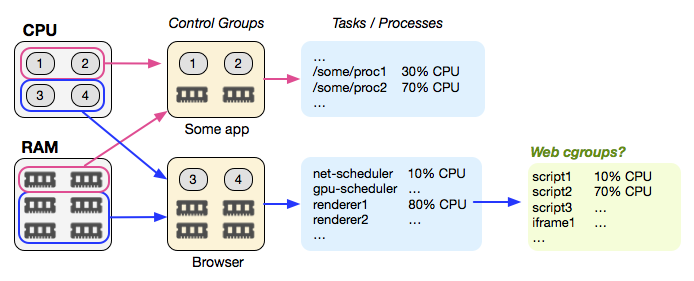
<p>Conceptually, the above problem is nothing new. For example, <a href="https://en.wikipedia.org/wiki/Cgroups">Linux control groups (cgroups)</a> address the very same issues "higher up" in the stack: multiple processes compete for a finite number of available resources on the device, and cgroups provide a mechanism by which resource allocation (CPU, GPU, memory, network, etc) can be specified and enforced at a per-process level - e.g. this process is allowed to use at most 10% of the CPU, 128MB of RAM, is rate-limited to 500Kbps of peak bandwidth, and is only allowed to download 10Mb in total.</p>

<p><img src='https://www.igvita.com/posts/16/cgroups.png' class='center' style='max-width:694px;width:100%' /></p>

<p>The problem is that we, as site developers, have no way to communicate and specify similar policies for resources that run on our sites. Today, including a script or an iframe gives it the keys to the kingdom: these resources execute with the same priority and with unrestricted access to the CPU, GPU, memory, and the network. As a result, the best we can do is cross our fingers and hope for the best.</p>

<div class="callout">
Arguably, <a href="https://developer.mozilla.org/en-US/docs/Web/Security/CSP/Introducing_Content_Security_Policy">Content-Security-Policy</a> offers a functional subset of the larger "cgroups for the web" problem: it allows the developer to control which origins the browser is allowed to access, and new <a href="https://w3c.github.io/webappsec-csp/embedded/">embedded enforcement</a> proposal extends this to subresources! However, this only controls the initial fetch, it does not address the resource footprint (CPU, GPU, memory, network, etc.) once it is executed by the browser.
</div>


<h2>Would cgroups for the web help?</h2>

<p>As a thought experiment, it may be worth considering how a cgroups-like policy could look like in the browser, and what we would want to control. What follows is a handwavy sketch, based on the frequent performance failure cases found in the wild, and conversations with teams that have found themselves in these types of predicaments:</p>

<div class="highlight"><pre><code class="language-html" data-lang="html"><span class="c">&lt;!-- &quot;background&quot; group should receive low CPU and network priority</span>
<span class="c">      and consume at most 5% of the available CPU and network resources --&gt;</span>
<span class="nt">&lt;meta</span> <span class="na">http-equiv=</span><span class="s">&quot;cgroup&quot;</span> <span class="na">name=</span><span class="s">&quot;background&quot;</span>
      <span class="na">content=</span><span class="s">&quot;cpu-share 0.05; cpu-priority low;</span>
<span class="s">               net-share 0.05; net-priority low;&quot;</span><span class="nt">&gt;</span>

<span class="c">&lt;!-- &quot;app&quot; group should receive high CPU priority and be allowed to</span>
<span class="c">      consume up to 80% of available CPU resources (don&#39;t hog all of CPU),</span>
<span class="c">      but be allowed to consume all of the available network resources --&gt;</span>
<span class="nt">&lt;meta</span> <span class="na">http-equiv=</span><span class="s">&quot;cgroup&quot;</span> <span class="na">name=</span><span class="s">&quot;app&quot;</span>
             <span class="na">content=</span><span class="s">&quot;cpu-share 0.8; cpu-priority high;</span>
<span class="s">                      net-share 1.0; net-priority high&quot;</span><span class="nt">&gt;</span>

<span class="c">&lt;!-- &quot;ads&quot; group should receive at most 20% of the cpu and have lower</span>
<span class="c">     scheduling and network priority then &quot;app&quot; content. --&gt;</span>
<span class="nt">&lt;meta</span> <span class="na">http-equiv=</span><span class="s">&quot;cgroup&quot;</span> <span class="na">name=</span><span class="s">&quot;ads&quot;</span>
             <span class="na">content=</span><span class="s">&quot;cpu-share 0.2; cpu-priority medium;</span>
<span class="s">                      net-share 0.8; net-priority medium&quot;</span><span class="nt">&gt;</span>

...

<span class="c">&lt;!-- assign followng resources to &quot;app&quot; group --&gt;</span>
<span class="nt">&lt;link</span> <span class="na">cgroup=</span><span class="s">&quot;app&quot;</span> <span class="na">rel=</span><span class="s">&quot;stylesheet&quot;</span> <span class="na">href=</span><span class="s">&quot;/style.css&quot;</span><span class="nt">&gt;</span>
<span class="nt">&lt;script </span><span class="na">cgroup=</span><span class="s">&quot;app&quot;</span> <span class="na">src=</span><span class="s">&quot;/app.js&quot;</span> <span class="na">async</span><span class="nt">&gt;&lt;/script&gt;</span>

<span class="c">&lt;!-- assign followng resources to &quot;ads&quot; group --&gt;</span>
<span class="nt">&lt;script </span><span class="na">cgroup=</span><span class="s">&quot;ads&quot;</span> <span class="na">src=</span><span class="s">&quot;/ads-manager.js&quot;</span> <span class="na">async</span><span class="nt">&gt;&lt;/script&gt;</span>
<span class="nt">&lt;iframe</span> <span class="na">cgroup=</span><span class="s">&quot;ads&quot;</span> <span class="na">src=</span><span class="s">&quot;//3rdparty.com/widget&quot;</span><span class="nt">&gt;&lt;/iframe&gt;</span>

<span class="c">&lt;!-- assign followng resources to &quot;background&quot; group --&gt;</span>
<span class="nt">&lt;script </span><span class="na">cgroup=</span><span class="s">&quot;background&quot;</span> <span class="na">src=</span><span class="s">&quot;analytics.js&quot;</span> <span class="na">async</span><span class="nt">&gt;&lt;/script&gt;</span></code></pre></div>


<p>The above is not an exhaustive list of plausible directives; don't fixate on the syntax. The key point, and question, is whether it would be useful—both to site developers and browser developers—to have such annotations communicate the preferred priorities and resource allocation strategy on their page - e.g. some scripts are more important than others, some network fetches should have lower relative priority, and so on.</p>

<div class="callout">
Bonus: control groups are hierarchical. For example, if an iframe is allocated 30% of the available CPU cycles, then subresources executing within that iframe are sub-dividing the 30% allocated to the parent.
</div>


<h2>How does the browser <em>enforce</em> such policies?</h2>

<p>Well, it may not be able to, in the strict sense of that word. For example, if a "background" script is scheduled and decides to monopolize the renderer thread and run for 20 frames, there isn't much that the runtime can do—today, at least. However, the runtime can use the provided information to decide which callback or function to schedule next, or how to prioritize loading of resources. Some browsers may be able to do a better job of enforcing such policies, but even small scheduling optimizations can yield significant user-visible wins. Today, the browser is running blind.</p>

<p>Further, <strong>once the browser knows the "desired allocation", it can flag and warn the developer when there is a mismatch at runtime</strong> - e.g. it can fire events via PerformanceObserver to notify the app of violations, allowing the developer to gather and act on this data. In effect, this could be the first step towards enabling attribution and visibility into the real-world runtime performance and impact of various resources.</p>

<p>Perhaps an idea worth exploring?</p>
]]></content>
 </entry>


 <entry>
   <title type="html"><![CDATA[The "Average Page" is a myth]]></title>
   <link href="https://www.igvita.com/2016/01/12/the-average-page-is-a-myth/"/>
   <updated>2016-01-12T00:00:00-08:00</updated>
   <id>https://www.igvita.com/2016/01/12/the-average-page-is-a-myth/</id>
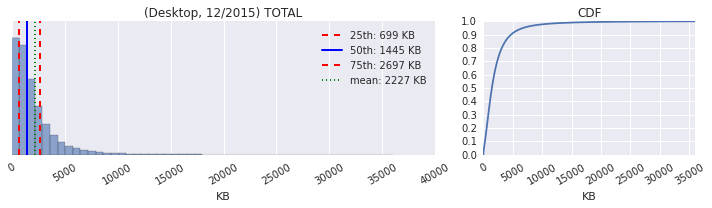
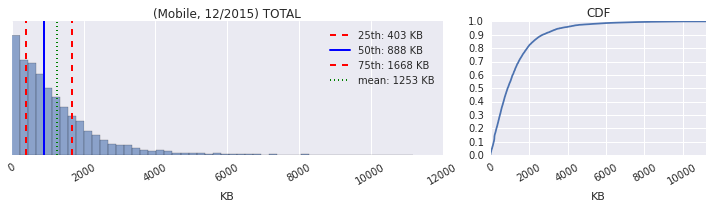
   <content type="html"><![CDATA[<p><img src='https://www.igvita.com/posts/16/normal-distribution.png' class='left' />As anyone and everyone in the web performance community will tell you, the size of the average page is continuously getting bigger: more JavaScript, more image and video bytes, growing use of web fonts, and so on. In fact, as of December 2015, the <a href="http://httparchive.org/">HTTP Archive</a> shows that the average desktop site weighs in at <a href="http://httparchive.org/trends.php?s=All&amp;minlabel=Jan+1+2015&amp;maxlabel=Dec+15+2015">2227KB</a>, and mobile is up to <a href="http://mobile.httparchive.org/trends.php?s=All&amp;minlabel=Jan+1+2015&amp;maxlabel=Dec+15+2015">1253KB</a>.</p>

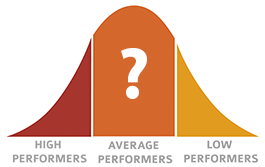
<p><strong>Except, what is an "average page", exactly?</strong> Intuitively, it is a page that is representative of the web at large, in its payload size, distribution of bytes between different content types, etc. More technically, it is a <a href="https://en.wikipedia.org/wiki/Central_tendency">measure of central tendency</a> of the underlying distribution - e.g. for a normal distribution the average is the central peak, with 50% values greater and 50% values smaller than its value. Which, of course, begs the question: what is the shape and type of the distribution for transferred bytes and does it match this model? Let's plot the histogram and the <a href="http://www.epixanalytics.com/modelassist/CrystalBall/Model_Assist.htm#Presenting_results/Cumulatve_plots/Cumulative_probability_plots.htm">CDF plots</a>...</p>

<p><img src='https://www.igvita.com/posts/16/desktop-distribution.png' class='center' style='max-width:713px;width:100%' /></p>

<ul>
<li>The x-axis shows that we have outliers weighing in at 30MB+.</li>
<li>The quantile values are 25th: 699KB, 50th (median): 1445KB, 75th: 2697KB.</li>
<li>The CDF plot shows that 90%+ of the pages are under 5000KB.</li>
</ul>


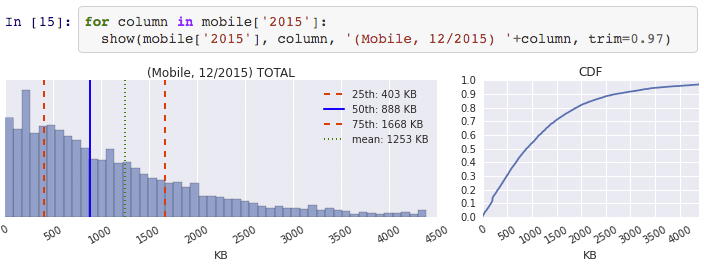
<p><img src='https://www.igvita.com/posts/16/mobile-distribution.png' class='center' style='max-width:713px;width:100%' /></p>

<ul>
<li>The x-axis shows that we have outliers weighing in at 10MB+.</li>
<li>The quantile values are 25th: 403KB, 50th (median): 888KB, 75th: 1668KB.</li>
<li>The CDF plot shows that 90%+ of the pages are under 3000KB.</li>
</ul>


<p><strong>Let's start with the obvious: the transfer size is not normally distributed, and there is no meaningful "central value" and talking about the mean is meaningless, if not deceiving</strong> - see "<a href="https://introductorystats.wordpress.com/2011/09/04/when-bill-gates-walks-into-a-bar/">Bill Gates walks into a bar...</a>". We need a much richer and nuanced language and statistics to capture what's going on here, and an even richer set of tools and methods to analyze how these values change over time. The "average page" is a myth.</p>

<div class="callout">I've been as guilty as anyone in (ab)using averages when talking about this data: they're easy to get and simple to communicate. Except, they're also meaningless in this context. My 2016 resolution is to kick this habit. Join me.</div>


<h2>Page weight as of December 2015</h2>

<p>Coming up with a small set of descriptive statistics for a dataset is hard, and attempting to reduce a dataset as rich as HTTP Archive down to a single one is an act of folly. Instead, we need to visualize the data and start asking questions.</p>

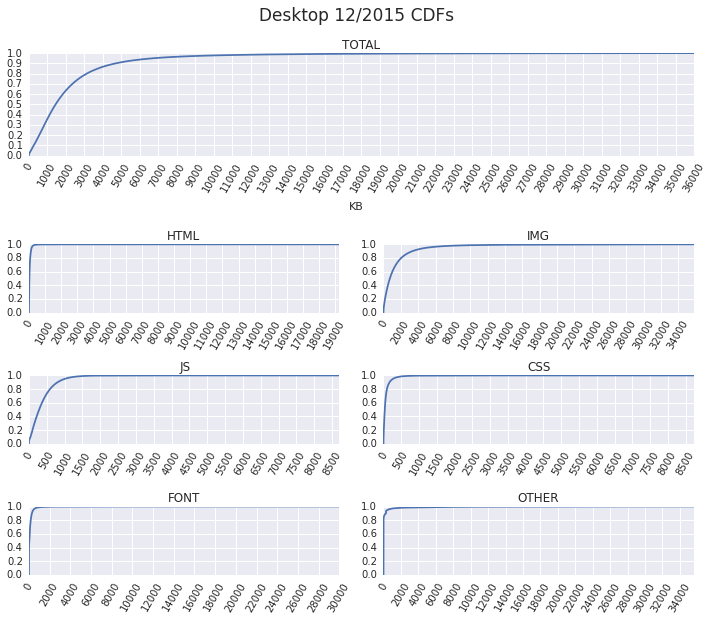
<p><strong>For example, why are some pages so heavy?</strong> A <a href="http://bigqueri.es/t/what-is-the-root-cause-of-outliers-by-page-weight/661">cursory look shows</a> that the heaviest ~3% by page weight, both for desktop (>7374KB) and mobile (>4048KB), are often due to large (and/or heavy) number of images. Emphasis on <em>often</em>, because a deeper look at the most popular content types shows outliers in each and every category. For example, plotting the CDFs for desktop pages yields:</p>

<p><img src='https://www.igvita.com/posts/16/desktop-cdfs.png' class='center' style='max-width:713px;width:100%' /></p>

<p>We have pages that fetch tens of megabytes of HTML, images, video, and fonts, as well as high single-digit megabytes of JavaScript and CSS. Each of these "obese" outliers is worth digging into, but we'll leave that for a separate investigation. Let's compare this data to the mobile dataset.</p>

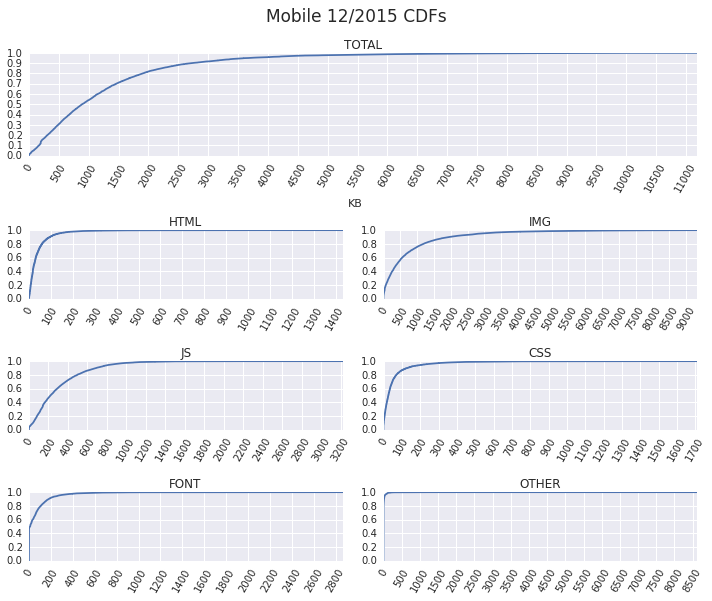
<p><img src='https://www.igvita.com/posts/16/mobile-cdfs.png' class='center' style='max-width:712px;width:100%' /></p>

<p>Lots of outliers as well, but the tails for mobile pages are not nearly as long. This alone explains much of the dramatic "average page" difference (desktop: 2227KB, mobile: 1253KB) &mdash; averages are easily skewed by a few large numbers. <strong>Focusing on the average leads us to believe that mobile pages are significantly "lighter", whereas in reality all we can say so far is that the desktop distribution has a longer tail with much heavier pages.</strong></p>

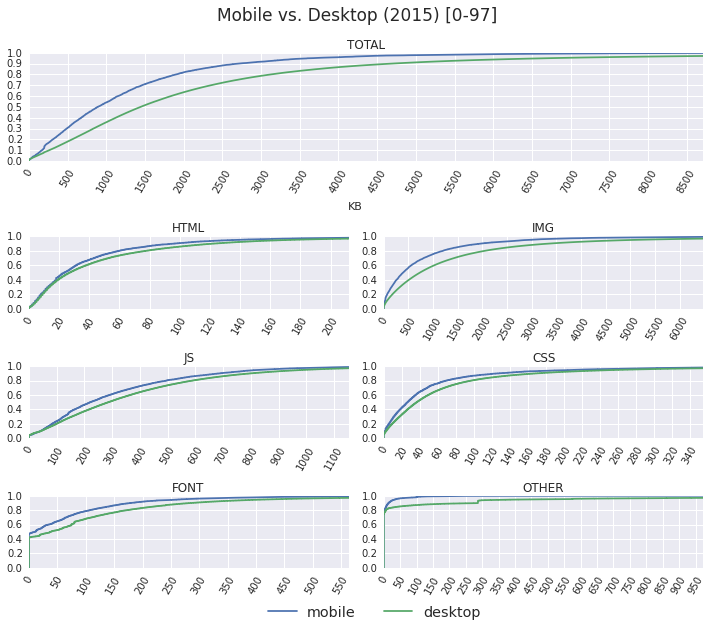
<p>To get a better sense for the difference in distributions between the desktop and mobile pages, let's exclude the heaviest 3% that compress all of our graphs and zoom in on the [0, 97%] interval:</p>

<p><img src='https://www.igvita.com/posts/16/mobile-desktop-cdf-2015.png' class='center' style='max-width:711px;width:100%' /></p>

<p>Mobile pages do appear to consume fewer bytes. For example, a 1000KB budget would allow the client to fetch fully ~38% of desktop pages vs. 54% of mobile pages. However, while the savings for mobile pages are present for all content types, the absolute differences for most of them are not drastic. Most of the total byte difference is explained by fewer image bytes. <strong>Structurally, mobile pages are not dramatically different from desktop pages.</strong></p>

<h2>Changes in page weight over time</h2>

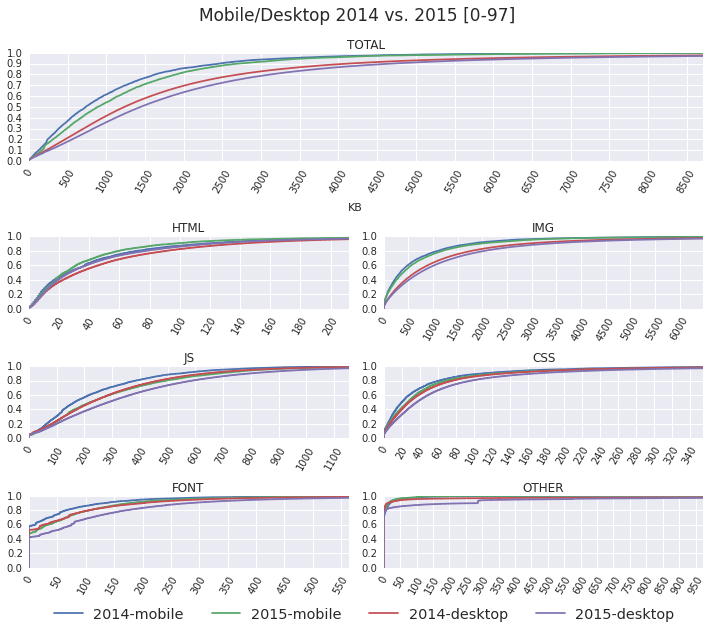
<p><img src='https://www.igvita.com/posts/16/mobile-desktop-cdf-2014-2015.png' class='center' style='max-width:711px;width:100%' /></p>

<p>Comparing the CDFs against the year prior shows that the transfers sizes for most content types have increased for both the desktop and mobile pages. However, there are some unexpected and interesting results as well:</p>

<ul>
<li><strong>The amount of shipped HTML bytes has decreased!</strong></li>
<li><strong>2015-mobile and 2014-desktop distributions tend to overlap.</strong></li>
</ul>


<p>In terms of bytes fetched, for everything but images, mobile pages are a year behind their desktop counterparts? Intuitively, this makes sense, just because we're working with a smaller screen doesn't mean the required functionality is less, or less complex.</p>

<h2>Take the data out for a spin...</h2>

<p><img src='https://www.igvita.com/posts/16/datalab-workbook.png' class='center' style='max-width:704px;width:100%' /></p>

<p>My goal here is to raise questions, not to provide answers; this is a very shallow analysis of a very rich dataset. For a deeper and a more hands-on look at this data, take a look at <a href="https://github.com/igrigorik/httparchive/blob/master/datalab/histograms.ipynb">my Datalab workbook</a>. Better, clone it, <a href="https://cloud.google.com/datalab/">run your own analysis</a>, and <a href="http://bigqueri.es">share</a> your results! If we want to talk about the trends, outliers, and their causes on the web, then we need to understand this data at a much deeper level.</p>
]]></content>
 </entry>


 <entry>
   <title type="html"><![CDATA[Don't lose user and app state, use Page Visibility]]></title>
   <link href="https://www.igvita.com/2015/11/20/dont-lose-user-and-app-state-use-page-visibility/"/>
   <updated>2015-11-20T00:00:00-08:00</updated>
   <id>https://www.igvita.com/2015/11/20/dont-lose-user-and-app-state-use-page-visibility/</id>
   <content type="html"><![CDATA[<p><strong>Great applications do not lose user's progress and app state.</strong> They automatically save the necessary data without interrupting the user and transparently restore themselves as and when necessary - e.g. after coming back from a background state or an unexpected shutdown.</p>

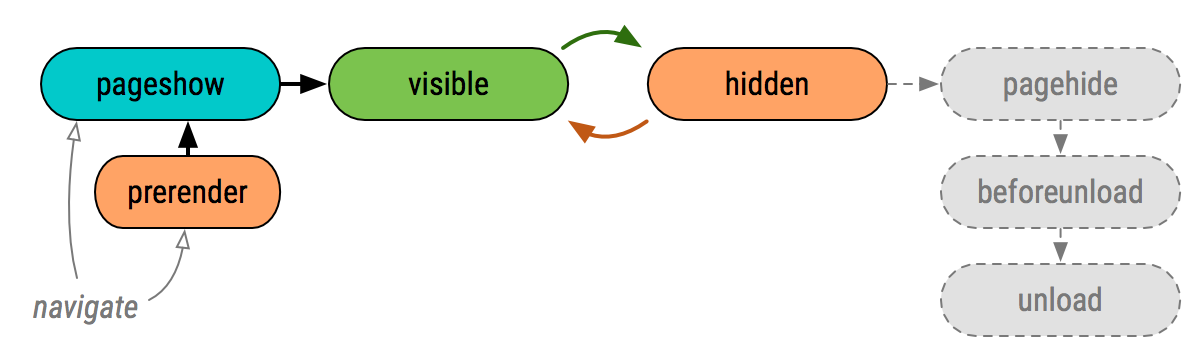
<p>Unfortunately, many web applications get this wrong because they fail to account for the mobile lifecycle: they're listening for the wrong events that may never fire, or ignore the problem entirely at the high cost of poor user experience. To be fair, the web platform also doesn't make this easy by exposing (too) many different events: <a href="http://w3c.github.io/page-visibility/#introduction">visibilityState</a>, <a href="https://developer.mozilla.org/en-US/docs/Web/Events/pageshow">pageshow</a>, <a href="https://developer.mozilla.org/en-US/docs/Web/Events/pagehide">pagehide</a>, <a href="https://developer.mozilla.org/en-US/docs/Web/Events/beforeunload">beforeunload</a>, <a href="https://developer.mozilla.org/en-US/docs/Web/Events/unload">unload</a>. Which should we use, and when?</p>

<p><img src='https://www.igvita.com/posts/15/lifecycle-events.png' class='center' style='max-width:600px;width:100%' /></p>

<p><strong>You cannot rely on <code>pagehide</code>, <code>beforeunload</code>, and <code>unload</code> events to fire on mobile platforms.</strong> This is not a bug in your favorite browser; this is due to how all mobile operating systems work. An active application can transition into a "background state" via several routes:</p>

<ul>
<li>The user can click on a notification and switch to a different app.</li>
<li>The user can invoke the task switcher and move to a different app.</li>
<li>The user can hit the "home" button and go to homescreen.</li>
<li>The OS can switch the app on users behalf - e.g. due to an incoming call.</li>
</ul>


<p>Once the application has transitioned to background state, it may be killed without any further ceremony - e.g. the OS may terminate the process to reclaim resources, the user can swipe away the app in the task manager. As a result, you should assume that "clean shutdowns" that fire the <code>pagehide</code>, <code>beforeunload</code>, and <code>unload</code> events are the exception, not the rule.</p>

<p>To provide a reliable and consistent user experience, both on desktop and mobile, the application must use <a href="http://w3c.github.io/page-visibility/#introduction">Page Visibility API</a> and execute its session save and restore logic whenever <code>visibilityChange</code> state changes. This is the only event your application can count on.</p>

<div class="highlight"><pre><code class="language-js" data-lang="js"><span class="c1">// query current page visibility state: prerender, visible, hidden</span>
<span class="kd">var</span> <span class="nx">pageVisibility</span> <span class="o">=</span> <span class="nb">document</span><span class="p">.</span><span class="nx">visibilityState</span><span class="p">;</span>

<span class="c1">// subscribe to visibility change events</span>
<span class="nb">document</span><span class="p">.</span><span class="nx">addEventListener</span><span class="p">(</span><span class="s1">&#39;visibilitychange&#39;</span><span class="p">,</span> <span class="kd">function</span><span class="p">()</span> <span class="p">{</span>
  <span class="c1">// fires when user switches tabs, apps, goes to homescreen, etc.</span>
    <span class="k">if</span> <span class="p">(</span><span class="nb">document</span><span class="p">.</span><span class="nx">visibilityState</span> <span class="o">==</span> <span class="s1">&#39;hidden&#39;</span><span class="p">)</span> <span class="p">{</span> <span class="p">...</span> <span class="p">}</span>

    <span class="c1">// fires when app transitions from prerender, user returns to the app / tab.</span>
    <span class="k">if</span> <span class="p">(</span><span class="nb">document</span><span class="p">.</span><span class="nx">visibilityState</span> <span class="o">==</span> <span class="s1">&#39;visible&#39;</span><span class="p">)</span> <span class="p">{</span> <span class="p">...</span> <span class="p">}</span>
<span class="p">});</span></code></pre></div>


<p>If you're counting on <code>unload</code> to save state, record and report analytics data, and execute other relevant logic, then you're missing a large fraction of mobile sessions where <code>unload</code> will never fire. Similarly, if you're counting on <code>beforeunload</code> event to prompt the user about unsaved data, then you're ignoring that "clean shutdowns" are an exception, not the rule.</p>

<p><strong>Use Page Visibility API and forget that the other events even exist.</strong> Treat every transition to <code>visible</code> as a new session: restore previous state, reset your analytics counters, and so on. Then, when the application transitions to <code>hidden</code> end the session: save user and app state, beacon your analytics, and perform all other necessary work.</p>

<div class="callout">
If necessary, with a bit of extra work you can aggregate these visibility-based sessions into larger user flows that account for app and tab switching - e.g. report each session to the server and have it aggregate multiple sessions together.
</div>


<h2>Practical implementation considerations</h2>

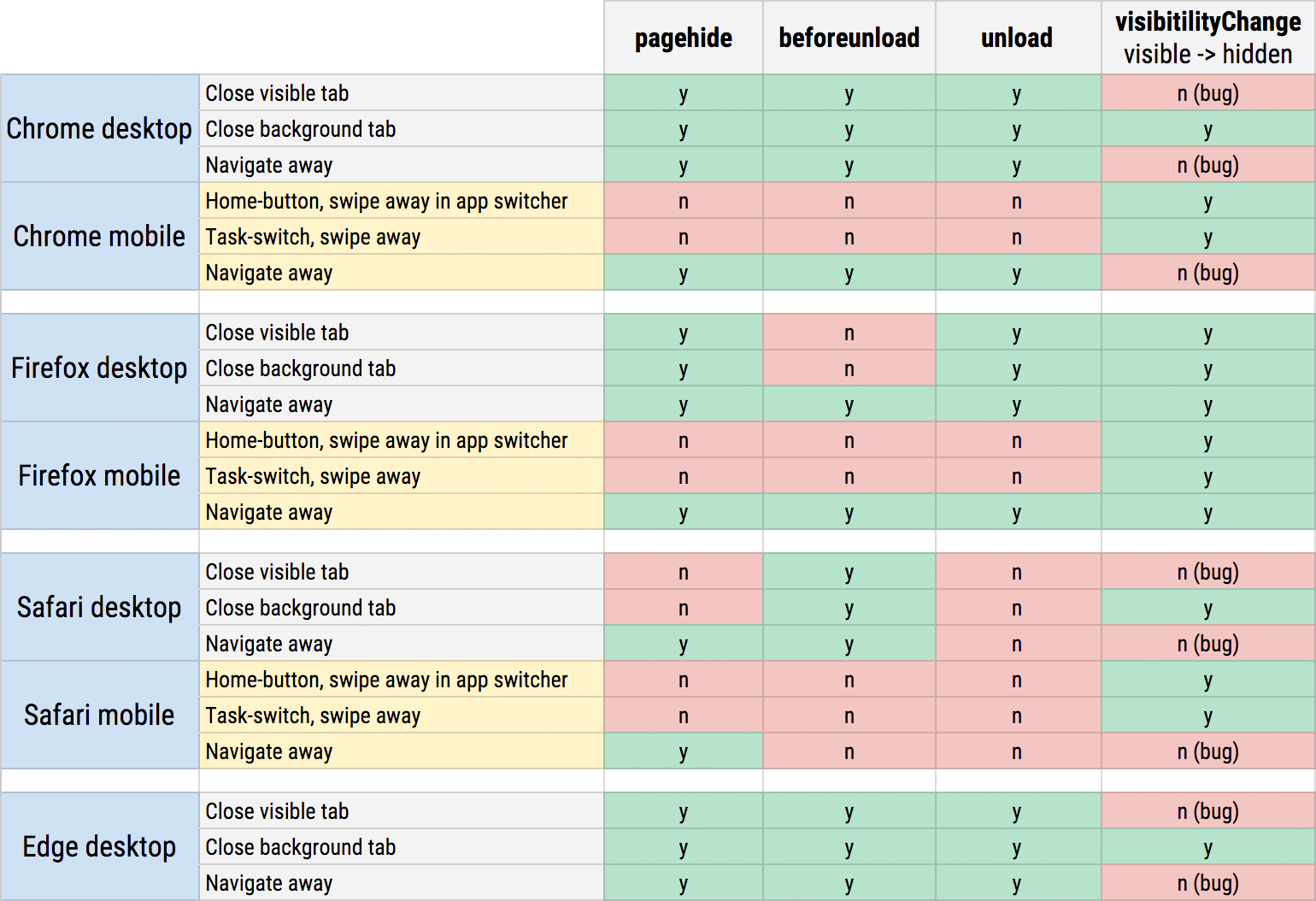
<p>In the long term, all you need is the Page Visibility API. As of today, you will have to augment it with one other event &mdash; <code>pagehide</code>, to be specific &mdash; to account for the "when the page is being unloaded" case. For the curious, here's a full matrix of which events fire in each browser today (based on my <a href="http://output.jsbin.com/zubiyid/latest/quiet">manual testing</a>):</p>

<p><img src='https://www.igvita.com/posts/15/lifecycle-events-testing.png' class='center' style='max-width:770px;width:100%' /></p>

<ul>
<li><code>visibilityChange</code> works reliably for task-switching on mobile platforms.</li>
<li><code>beforeunload</code> is of limited value as it only fires on desktop navigations.</li>
<li><code>unload</code> does not fire on mobile and desktop Safari.</li>
</ul>


<p>The good news is that Page Visibility reliably covers task-switching scenarios across all platforms and browser vendors. The bad news is that today Firefox is the only implementation that fires the <code>visibilityChange</code> event when the page is unloaded &mdash; <a href="https://code.google.com/p/chromium/issues/detail?id=554834">Chrome</a>, <a href="https://bugs.webkit.org/show_bug.cgi?id=151234">WebKit</a>, and <a href="https://github.com/w3c/page-visibility/issues/18#issuecomment-156031906">Edge</a> bugs to address this. Once those are resolved, <code>visibilityState</code> is the only event you'll need to provide a great user experience.</p>
]]></content>
 </entry>


 <entry>
   <title type="html"><![CDATA[Eliminating Roundtrips with Preconnect]]></title>
   <link href="https://www.igvita.com/2015/08/17/eliminating-roundtrips-with-preconnect/"/>
   <updated>2015-08-17T00:00:00-07:00</updated>
   <id>https://www.igvita.com/2015/08/17/eliminating-roundtrips-with-preconnect/</id>
   <content type="html"><![CDATA[<p>The "simple" act of initiating an HTTP request can incur many roundtrips before the actual request bytes are routed to the server: the browser may have to resolve the DNS name, perform the TCP handshake, and negotiate the TLS tunnel if a secure socket is required. All accounted for, that's anywhere from one to three &mdash; and more in unoptimized cases &mdash; roundtrips of latency to set up the socket before the actual request bytes are routed to the server.</p>

<p><img src='https://www.igvita.com/posts/15/socket-setup.png' class='center' style='max-width:770px;width:100%' /></p>

<p>Modern browsers <a href="https://www.igvita.com/posa/high-performance-networking-in-google-chrome/#tcp-pre-connect">try their best to anticipate</a> what connections the site will need before the actual request is made. By initiating early <em>"preconnects"</em>, the browser can set up the necessary sockets ahead of time and eliminate the costly DNS, TCP, and TLS roundtrips from the critical path of the actual request. That said, as smart as modern browsers are, they cannot reliably predict all the preconnect targets for each and every website.</p>

<p><strong>The good news is that we can &mdash; finally &mdash; help the browser; we can tell the browser which sockets we will need ahead of initiating the actual requests via the new <a href="http://w3c.github.io/resource-hints/#preconnect">preconnect hint</a> shipping in <a href="https://developer.mozilla.org/en-US/Firefox/Releases/39#HTML">Firefox 39</a> and <a href="https://www.chromestatus.com/feature/5560623895150592">Chrome 46</a>!</strong> Let's take a look at some hands-on examples of how and where you might want to use it.</p>

<h2>Preconnect for dynamic request URLs</h2>

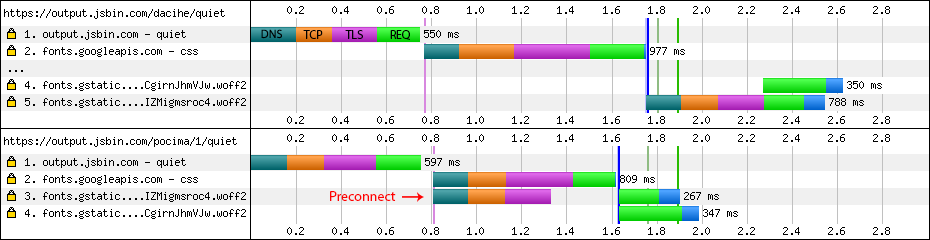
<p>Your application may not know the full resource URL ahead of time due to conditional loading logic, UA adaptation, or other reasons. However, if the origin from which the resources are going to be fetched is known, then a preconnect hint is a perfect fit. Consider the following example with Google Fonts, both with and without the preconnect hint:</p>

<p><img src='https://www.igvita.com/posts/15/font-preconnect.png' class='center' style='max-width:770px;width:100%' /></p>

<p>In the <a href="https://output.jsbin.com/dacihe/quiet">first trace</a>, the browser fetches the HTML and discovers that it needs a CSS resource residing on <code>fonts.googleapis.com</code>. With that downloaded it <a href="https://developers.google.com/web/fundamentals/performance/critical-rendering-path/constructing-the-object-model?hl=en">builds the CSSOM</a>, determines that the page will need two fonts, and initiates requests for each from <code>fonts.gstatic.com</code> &mdash; first though, it needs to perform the DNS, TCP, and TLS handshakes with that origin, and once the socket is ready both requests are multiplexed over the HTTP/2 connection.</p>

<div class="highlight"><pre><code class="language-html" data-lang="html"><span class="nt">&lt;link</span> <span class="na">href=</span><span class="s">&#39;https://fonts.gstatic.com&#39;</span> <span class="na">rel=</span><span class="s">&#39;preconnect&#39;</span> <span class="na">crossorigin</span><span class="nt">&gt;</span>
<span class="nt">&lt;link</span> <span class="na">href=</span><span class="s">&#39;https://fonts.googleapis.com/css?family=Roboto+Slab:700|Open+Sans&#39;</span> <span class="na">rel=</span><span class="s">&#39;stylesheet&#39;</span><span class="nt">&gt;</span></code></pre></div>


<p>In the <a href="https://output.jsbin.com/pocima/1/quiet">second trace</a>, we add the <em>preconnect hint</em> in our markup indicating that the application will fetch resources from <code>fonts.gstatic.com</code>. <strong>As a result, the browser begins the socket setup in parallel with the CSS request, completes it ahead of time, and allows the font requests to be sent immediately!</strong> In this particular scenario, preconnect removes three RTTs from the critical path and eliminates over half of second of latency.</p>

<div class="callout">
The <a href="http://www.w3.org/TR/css3-fonts/#font-fetching-requirements">font-face specification requires</a> that fonts are loaded in "anonymous mode", which is why we must provide the <code>crossorigin</code> attribute on the preconnect hint: the browser maintains a separate pool of sockets for this mode.
</div>


<h2>Initiating preconnect via Link HTTP header</h2>

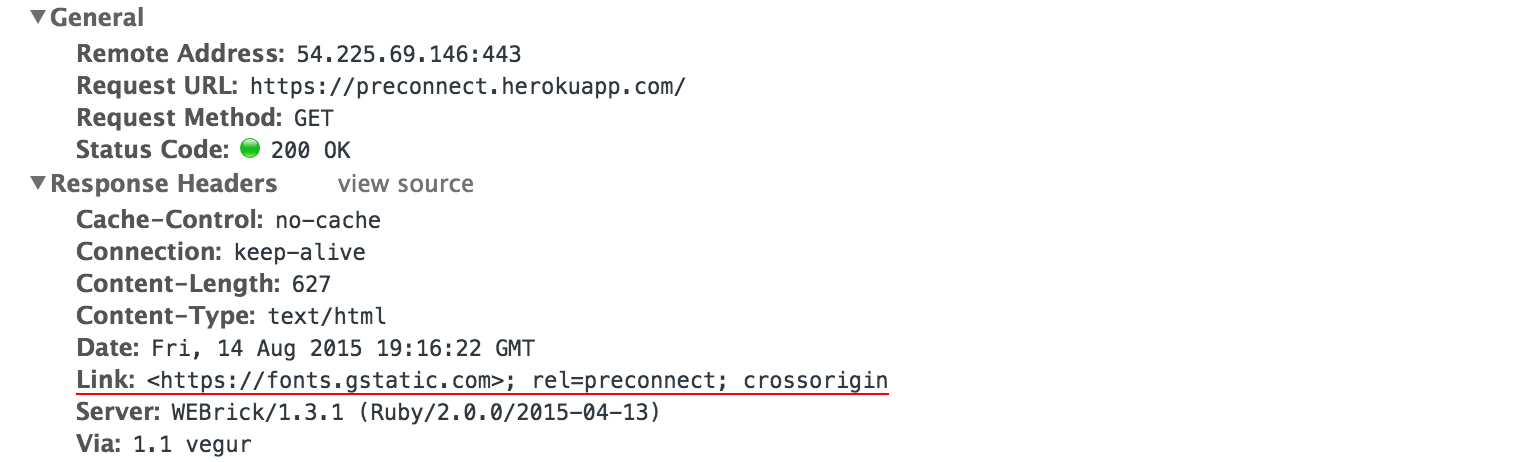
<p>In addition to declaring the preconnect hints via HTML markup, we can also deliver them via an HTTP <code>Link</code> header. For example, to achieve <a href="http://www.webpagetest.org/result/150812_9H_10VA/1/details/">the same preconnect benefits</a> as above, the server could have delivered the preconnect hint without modifying the page markup - see below. <strong>The <code>Link</code> header mechanism allows <em>each response</em> to indicate to the browser which other origins it should connect to ahead of time.</strong> For example, included widgets and dependencies can help optimize performance by indicating which other origins they will need, and so on.</p>

<p><img src='https://www.igvita.com/posts/15/preconnect-header.png' class='center' style='max-width:770px;width:100%' /></p>

<h2>Preconnect with JavaScript</h2>

<p>We don't have to declare all preconnect origins upfront. <strong>The application can invoke preconnects in response to user input, anticipated activity, or other user signals with the help of JavaScript.</strong> For example, consider the case where an application anticipates the likely navigation target and issues an early preconnect:</p>

<div class="highlight"><pre><code class="language-js" data-lang="js"><span class="kd">function</span> <span class="nx">preconnectTo</span><span class="p">(</span><span class="nx">url</span><span class="p">)</span> <span class="p">{</span>
    <span class="kd">var</span> <span class="nx">hint</span> <span class="o">=</span> <span class="nb">document</span><span class="p">.</span><span class="nx">createElement</span><span class="p">(</span><span class="s2">&quot;link&quot;</span><span class="p">);</span>
    <span class="nx">hint</span><span class="p">.</span><span class="nx">rel</span> <span class="o">=</span> <span class="s2">&quot;preconnect&quot;</span><span class="p">;</span>
    <span class="nx">hint</span><span class="p">.</span><span class="nx">href</span> <span class="o">=</span> <span class="nx">url</span><span class="p">;</span>
    <span class="nb">document</span><span class="p">.</span><span class="nx">head</span><span class="p">.</span><span class="nx">appendChild</span><span class="p">(</span><span class="nx">hint</span><span class="p">);</span>
<span class="p">}</span></code></pre></div>


<p><img src='https://www.igvita.com/posts/15/reactive-preconnect.png' class='center' style='max-width:770px;width:100%' /></p>

<p>The user starts on <code>jsbin.com</code>; at ~3.0 second mark the page determines that the user might be navigating to <code>engineering.linkedin.com</code> and initiates a preconnect for that origin; at ~5.0 second mark the user initiates the navigation, and the request is dispatched without blocking on DNS, TCP, or TLS handshakes &mdash; nearly a second saved for the navigation!</p>

<h2>Preconnect often, Preconnect wisely</h2>

<p>Preconnect is an important tool in your optimization toolbox. As above examples illustrate, it can eliminate many costly roundtrips from your request path &mdash; in some cases reducing the request latency by hundreds and even thousands of milliseconds. That said, use it wisely: <strong>each open socket incurs costs both on the client and server, and you want to avoid opening sockets that might go unused.</strong> As always, apply, measure real-world impact, and iterate to get the best performance mileage from this feature.</p>

<p>Finally, for debugging purposes, do note that preconnect directives are treated as <em>optimization hints:</em> the browser might not act on each directive each and every time, and the browser is allowed to adjust its logic to perform a partial handshake - e.g. fall back to DNS lookup only, or DNS+TCP for TLS connections.</p>
]]></content>
 </entry>


 <entry>
   <title type="html"><![CDATA[Browser Progress Bar is an Anti-pattern]]></title>
   <link href="https://www.igvita.com/2015/06/25/browser-progress-bar-is-an-anti-pattern/"/>
   <updated>2015-06-25T00:00:00-07:00</updated>
   <id>https://www.igvita.com/2015/06/25/browser-progress-bar-is-an-anti-pattern/</id>
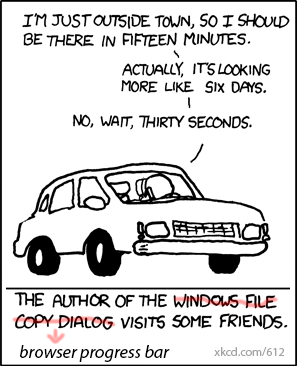
   <content type="html"><![CDATA[<p><img src='https://www.igvita.com/posts/15/progressbar.png' class='left' /> The user initiates a navigation, and the browser gets busy: it'll likely have to resolve a dozen DNS names, establish an even larger number of connections, and then dispatch one or more requests over each. In turn, for each request, it often does not know the response size (chunked transfers), and even when it does, it is still unable to reliably predict the download time due to variable network weather, server processing times, and so on. Finally, fetching and processing one resource might trigger an entire subtree of new requests.</p>

<p>Ok, so loading a page is complicated business, so what? Well, <strong>if there is no way to reliably predict how long the load might take, then why do so many browsers still use and show the <a href="https://en.wikipedia.org/wiki/Progress_bar">progress bar</a>?</strong> At best, the 0-100 indicator is a lie that misleads the user; worse, the success criteria is forcing developers to optimize for "onload time", which misses the <a href="https://developers.google.com/web/fundamentals/performance/critical-rendering-path/index?hl=en">progressive rendering experience</a> that modern applications are aiming to deliver. <strong>Browser progress bars fail both the users and the developers; we can and should do better.</strong></p>

<h2>Indeterminate indicators in post-onload era</h2>

<p>To be clear, <a href="https://en.wikipedia.org/wiki/Progress_indicator">progress indicators</a> are vital to helping the user understand that an operation is in progress. The browser <em>needs</em> to show some form of a busy indicator, and the important questions are: what type of indicator, whether progress can be estimated, and what criteria are used to trigger its display.</p>

<p>Some browsers have already replaced "progress bars" with "indeterminate indicators" that address the pretense of attempting to predict and estimate something that they can't. However, this treatment is inconsistent between different browser vendors, and even same browsers on different platforms &mdash; e.g. many mobile browsers use progress bars, whereas their desktop counterparts use indeterminate indicators. We need to fix this.</p>

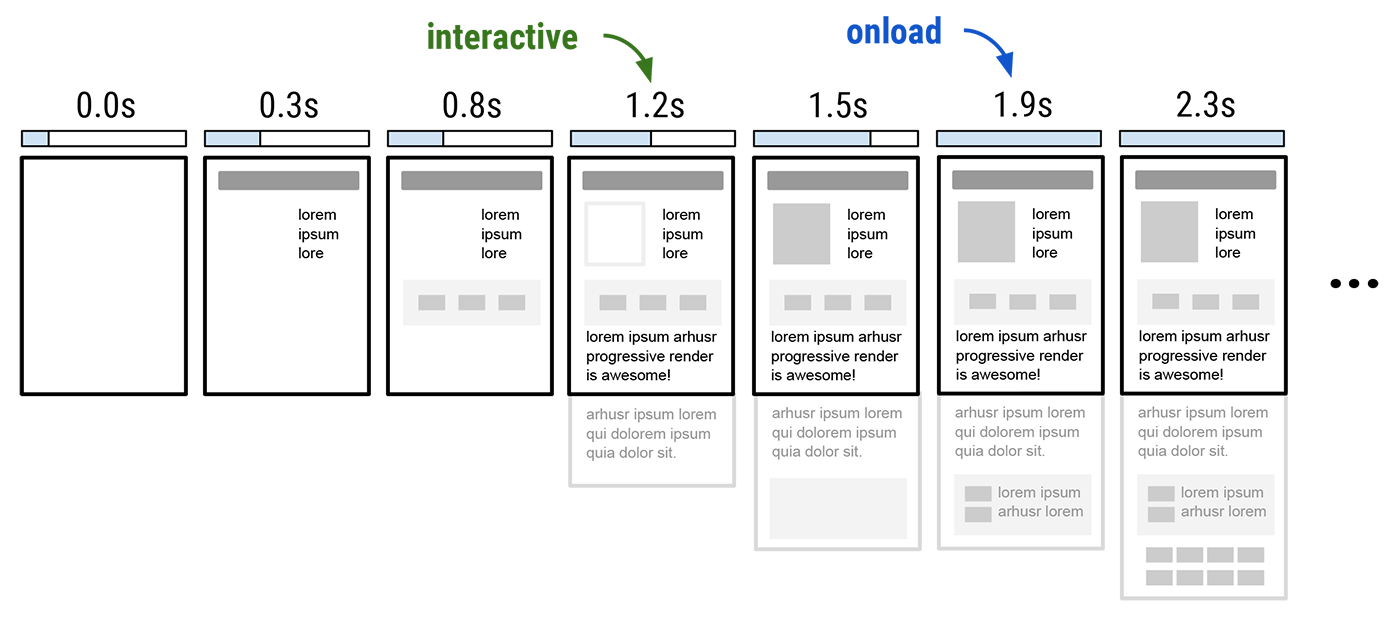
<p><img src='https://www.igvita.com/posts/15/progressive-rendering.png' class='center' style='max-width:700px;width:100%' /></p>

<p>Also, while we're on the subject, what are the conditions that trigger the browser's busy indicator anyway? Today the indicator is shown only while the page is loading: it is active until the <code>onload</code> event fires, which is supposed to indicate that the page has finished fetching all of the resources and is now "ready". However, in a world optimized for progressive rendering, this is an increasingly less than useful concept: the presence of an outstanding request does not mean the user can't or shouldn't interact with the page; many pages defer fetching and further processing until after <code>onload</code>; many pages trigger fetching and processing based on user input.</p>

<p>Time to <code>onload</code> is <a href="http://www.stevesouders.com/blog/2013/05/13/moving-beyond-window-onload/">bad performance metric</a> and one that developers have been gaming for a while. Making that the success criteria for the busy indicator seems like a decision worth revisiting. For example, instead of relying on what is now an arbitrary initialization milestone, what if it represented the pages ability to accept and process user input?</p>

<ul>
<li>Does the page have visible content and is it ready to accept input (e.g. touch, scroll)? Hide the busy indicator.</li>
<li>Is the UI thread busy (see <a href="http://jankfree.org/">jank</a>) due to long-running JavaScript or other work? Show the busy indicator until this condition is resolved; the busy indicator may be shown at any point in the application lifecycle.</li>
</ul>


<p>The initial page load is simply a special case of painting the first frame (ideally in &lt;1000ms), at which time the page is unable to process user input. Post first frame, if the UI thread is busy once again, then the browser can and should show the same indicator. Changing the busy indicator to signal interactivity would address our existing issues with penalizing progressive rendering, remove the need to continue gaming <code>onload</code>, and create direct incentives for developers to build and optimize for smooth and <a href="https://developers.google.com/web/fundamentals/performance/rendering/index?hl=en">jank-free experiences</a>.</p>
]]></content>
 </entry>


 <entry>
   <title type="html"><![CDATA[Fixing the 'Blank Text' Problem]]></title>
   <link href="https://www.igvita.com/2015/04/10/fixing-the-blank-text-problem/"/>
   <updated>2015-04-10T00:00:00-07:00</updated>
   <id>https://www.igvita.com/2015/04/10/fixing-the-blank-text-problem/</id>
   <content type="html"><![CDATA[<blockquote cite="CSS Fonts Module Level 3">In cases where textual content is loaded before downloadable fonts are available, user agents may render text as it would be rendered if downloadable font resources are not available or they may render text transparently with fallback fonts to avoid a flash of text using a fallback font - <a href="http://dev.w3.org/csswg/css-fonts/#font-face-loading">Font loading guidelines</a>.</blockquote>


<p>The ambiguity and lack of developer override in above spec language is a big gap and a performance problem. First, the ambiguity leaves us with <a href="https://www.igvita.com/2014/01/31/optimizing-web-font-rendering-performance/#timeouts">inconsistent behavior</a> across different browsers, and second, the lack of developer override means that we are either rendering content that should be blocked, or unnecessarily blocking rendering where a fallback would have been acceptable. There isn't a single strategy that works best in all cases.</p>

<h2>Let's quantify the problem</h2>

<p>How often does the above algorithm get invoked? What's the delta between the time the browser was first ready to render text and the font became available? Speaking of which, how long does it typically take the font download to complete? Can we just initiate the font fetch earlier to solve the problem?</p>

<p>As it happens, Chrome already tracks the necessary metrics to answer all of the above. Open a new tab and head to <code>chrome://histograms</code> to inspect the metrics (for the curious, check out <a href="https://code.google.com/p/chromium/codesearch#chromium/src/tools/metrics/histograms/histograms.xml">histograms.xml in Chromium source</a>) for your profile and navigation history. The specific metrics we are interested in are:</p>

<ul>
    <li><code>WebFont.HadBlankText</code>: count of times text rendering was blocked.</li>
    <li><code>WebFont.BlankTextShownTime</code>: duration of blank text due to blocked rendering.</li>
    <li><code>WebFont.DownloadTime.*</code>: time to fetch the font, segmented by filesize.</li>
    <li><code>PLT.NT_Request</code>: time to first response byte (TTFB).</li>
</ul>


<h2>Text rendering performance on Chrome for Android</h2>

<p>Inspecting your own histograms will, undoubtedly, reveal some interesting insights. However, is your profile data representative of the global population? Chrome aggregates <a href="https://www.google.com/chrome/browser/privacy/whitepaper.html#usagestats">anonymized usage statistics</a> from opted-in users to help the engineering team improve Chrome's features and performance, and I've pulled the same global metrics for Chrome for Android. Let's take a look...</p>

<table>
  <tbody>
    <tr>
      <td class="header"></td>
      <td class="header">50th</td>
      <td class="header">75th</td>
      <td class="header">95th</td>
    </tr>

    <tr>
      <td class="header">WebFont.DownloadTime.0.Under10KB</td>
      <td>~400 ms</td>
      <td>~750 ms</td>
      <td>~2300 ms</td>
    </tr>
    <tr>
      <td class="header">WebFont.DownloadTime.1.10KBTo50KB</td>
      <td>~500 ms</td>
      <td>~900 ms</td>
      <td>~2600 ms</td>
    </tr>
    <tr>
      <td class="header">WebFont.DownloadTime.2.50KBTo100KB</td>
      <td>~600 ms</td>
      <td>~1100 ms</td>
      <td>~3800 ms</td>
    </tr>
    <tr>
      <td class="header">WebFont.DownloadTime.3.100KBTo1MB</td>
      <td>~800 ms</td>
      <td>~1500 ms</td>
      <td>~5000 ms</td>
    </tr>

    <tr class="header">
      <td colspan=4 style="height:0px;background:#dbdbdb"></td>
    </tr>
    <tr>
      <td class="header">WebFont.BlankTextShownTime</td>
      <td>~350 ms</td>
      <td>~750 ms</td>
      <td>~2300 ms</td>
    </tr>

    <tr class="header">
      <td colspan=4 style="height:0px;background:#dbdbdb"></td>
    </tr>
    <tr>
      <td class="header">PLT.NT_Request</td>
      <td>~150 ms</td>
      <td>~380 ms</td>
      <td>~1300 ms</td>
    </tr>

    <tr class="header">
      <td colspan=4 style="height:0px;background:#dbdbdb"></td>
    </tr>
    <tr>
      <td class="header"></td>
      <td class="header">No blank text</td>
      <td class="header">Had blank text</td>
    </tr>
    <tr>
      <td class="header">WebFont.HadBlankText</td>
      <td>~71%</td>
      <td>~29%</td>
    </tr>
  </tbody>
</table>


<p><strong>29% of page loads on Chrome for Android displayed blank text:</strong> the user agent knew the text it needed to paint, but was blocked from doing so due to the unavailable font resource. In the median case the blank text time was ~350 ms, ~750 ms for the 75th percentile, and a scary ~2300 ms for the 95th.</p>

<p>Looking at the font download times, it is also clear that even the smallest fonts (&lt;10KB) can take multiple seconds to complete. Further, the time to fetch the font is significantly higher than the time to the first HTML response byte (see <code>PLT.NT_Request</code>) that may contain text that can be rendered. As a result, even if we were able to start the font fetch <em>in parallel</em> with the HTML request, there are still many cases where we would have to block text rendering. More realistically, the font fetch would be delayed until we know it is required, which means waiting for the HTML response, building the DOM, and resolving styles, all of which defer text rendering even further.</p>

<h2>Developers need control of the text rendering strategy</h2>

<p>As the above data illustrates, fetching the font sooner and optimizing the resource filesize are both important but not sufficient to eliminate the "blank text problem". The network fetch may take a while, and we can't control that.</p>

<p>That said, knowing this, we can provide the necessary controls to developers to specify the desired text rendering strategy: there are cases where using a fallback is a valid strategy, and there are cases when rendering should be blocked. Both strategies are valid and can coexist on the same page depending on the content being rendered.</p>

<p><strong>In short, text is almost always the single most important asset on the page, and we need to give developers control over how and when it's rendered.</strong> The <a href="https://lists.w3.org/Archives/Public/www-style/2015Mar/0381.html">CSS font rendering proposal</a> should, I hope, resolve this.</p>
]]></content>
 </entry>


 <entry>
   <title type="html"><![CDATA[Resilient Networking: Planning for Failure]]></title>
   <link href="https://www.igvita.com/2015/01/26/resilient-networking/"/>
   <updated>2015-01-26T00:00:00-08:00</updated>
   <id>https://www.igvita.com/2015/01/26/resilient-networking/</id>
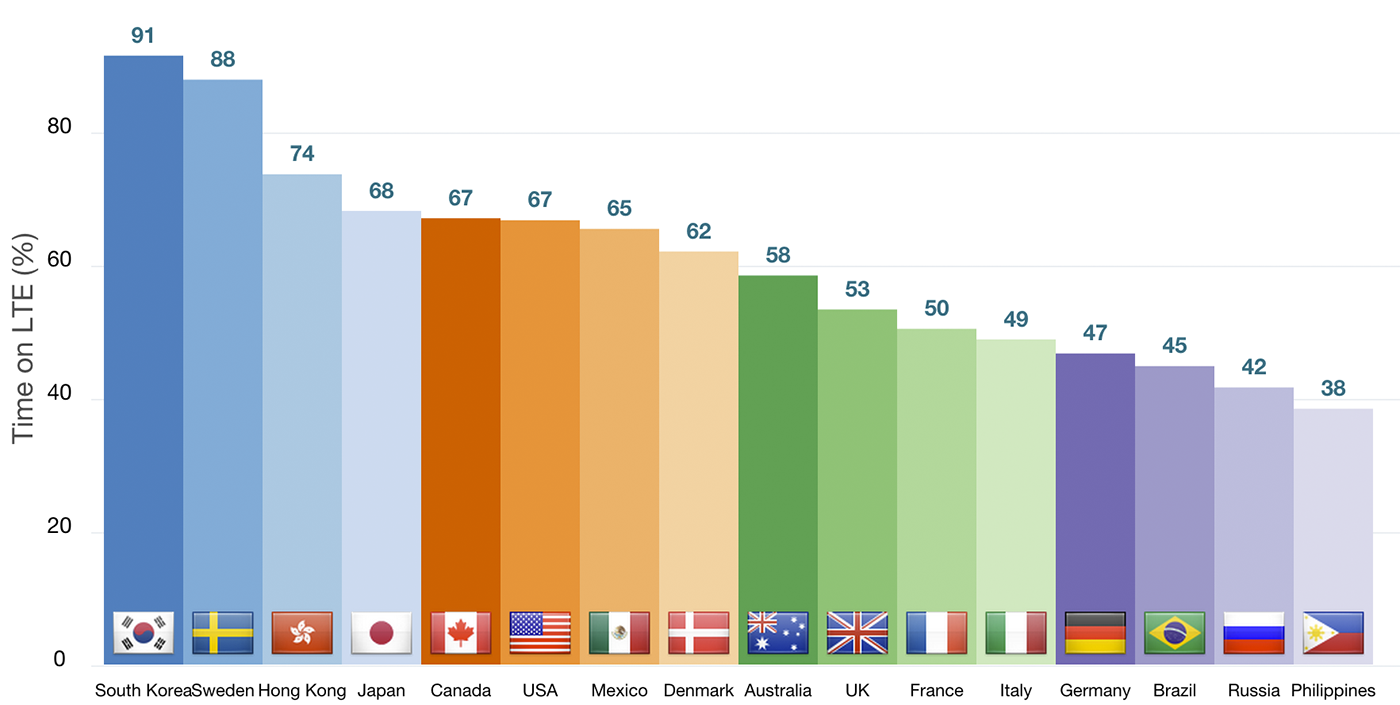
   <content type="html"><![CDATA[<p>A 4G user will experience a much better median experience both in terms of bandwidth and latency than a 3G user, but the same 4G user will also fall back to the 3G network for some of the time due to coverage, capacity, or other reasons. Case in point, <a href="http://opensignal.com/reports/state-of-lte-q1-2014/">OpenSignal data shows</a> that an average "4G user" in the US gets LTE service only ~67% of the time. In fact, in some cases the same "4G user" will even find themselves on 2G, or worse, with no service at all.</p>

<p><img src='https://www.igvita.com/posts/15/time-on-lte.png' class='center' style='max-width:700px;width:100%' /></p>

<p><strong>All connections are slow some of the time. All connections fail some of the time. All users experience these behaviors on their devices regardless of their carrier, geography, or underlying technology &mdash; 4G, 3G, or 2G.</strong></p>

<div class="callout">
You can use the <a href="http://opensignal.com/android/">OpenSignal Android app</a> to track own stats for 4G/3G/2G time, plus many other metrics. 
</div>


<h2>Why does this matter?</h2>

<p>Networks are not reliable, latency is not zero, and bandwidth is not infinite. Most applications ignore these simple truths and design for the best-case scenario, which leads to broken experiences whenever the network deviates from its optimal case. We treat these cases as exceptions but in reality they are the norm.</p>

<ul>
<li>All 4G users are 3G users some of the time.</li>
<li>All 3G users are 2G users some of the time.</li>
<li>All 2G users are offline some of the time.</li>
</ul>


<p>Building a product for a market dominated by 2G vs. 3G vs. 4G users might require an entirely different architecture and set of features. However, a 3G user is also a 2G user some of the time; a 4G user is both a 3G and a 2G user some of the time; all users are offline some of the time. <strong>A successful application is one that is resilient to fluctuations in network availability and performance: it can take advantage of the peak performance, but it plans for and continues to work when conditions degrade.</strong></p>

<h2>So what do we do?</h2>

<p>Failing to plan for variability in network performance is planning to fail. Instead, we need to accept this condition as a normal operational case and design our applications accordingly. A simple, but effective strategy is to adopt a "<a href="http://techblog.netflix.com/2012/07/chaos-monkey-released-into-wild.html">Chaos Monkey</a> approach" within our development cycle:</p>

<ul>
<li><strong>Define an acceptable SLA for each network request</strong>

<ul>
<li>Interactive requests should respect <a href="http://chimera.labs.oreilly.com/books/1230000000545/ch10.html#SPEED_PERFORMANCE_HUMAN_PERCEPTION">perceptual time constants</a>.</li>
<li>Background requests can take longer but should not be unbounded.</li>
</ul>
</li>
<li><strong>Make failure the norm, instead of an exception</strong>

<ul>
<li>Force offline mode for some periods of time.</li>
<li>Force some fraction of requests to exceed the defined SLA.</li>
<li>Deal with SLA failures instead of ignoring them.</li>
</ul>
</li>
</ul>


<p>Degraded network performance and offline are the norm not an exception. You can't bolt-on an offline mode, or add a "degraded network experience" after the fact, just as you can't add performance or security as an afterthought. To succeed, we need to design our applications with these constraints from the beginning.</p>

<h2>Tooling and API's</h2>

<p>Are you using a network proxy to emulate a slow network? That's a start, but it doesn't capture the real experience of your average user: a 4G user is fast most of the time and slow or offline some of the time. We need better tools that can emulate and force these behaviors when we develop our applications. Testing against <code>localhost</code>, where latency is zero and bandwidth is infinite, is a recipe for failure.</p>

<p>We need API's and frameworks that can facilitate and guide us to make the right design choices to account for variability in network performance. For the web, ServiceWorker is going to be a <a href="http://jakearchibald.com/2014/offline-cookbook/">critical piece</a>: it enables offline, and it allows full control over the request lifecycle, such as controlling SLA's, background updates, and more.</p>
]]></content>
 </entry>


 <entry>
   <title type="html"><![CDATA[Capability Reporting with Service Worker]]></title>
   <link href="https://www.igvita.com/2014/12/15/capability-reporting-with-service-worker/"/>
   <updated>2014-12-15T00:00:00-08:00</updated>
   <id>https://www.igvita.com/2014/12/15/capability-reporting-with-service-worker/</id>
   <content type="html"><![CDATA[<p><em>Some people, when confronted with a problem, think: “I'll use UA/device detection!” Now they have two problems...</em></p>

<p>But, despite all of its pitfalls, <a href="http://www.otsukare.info/2014/03/31/ua-detection-use-cases">UA/device detection</a> is a <a href="https://etherpad.mozilla.org/uadetection-usecases">fact of life</a>, a <a href="http://www.brucelawson.co.uk/2014/device-detection-responsive-web-design/">growing business</a>, and an enabling business requirement for many. The problem is that UA/device detection often frequently misclassifies capable clients (e.g. <a href="http://msdn.microsoft.com/en-us/library/ie/hh869301%28v=vs.85%29.aspx#ie11">IE11 was forced to change their UA</a>); leads to compatibility nightmares; can't account for continually changing user and runtime preferences. That said, when used correctly it <a href="http://calendar.perfplanet.com/2014/support-the-old-optimise-for-the-new/">can also be used for good</a>.</p>

<p>Browser vendors would love to drop the User-Agent string entirely, but that would break too many things. However, while it is fashionable to demonize UA/device detection, the root problem is not in the intent behind it, but in how it is currently deployed. <strong>Instead of "detecting" (i.e. guessing) the client capabilities through an opaque version string, we need to change the model to allow the user agent to "report" the necessary capabilities.</strong></p>

<p>Granted, this is <a href="http://www.w3.org/TR/2004/REC-CCPP-struct-vocab-20040115/">not a new idea</a>, but previous attempts seem to introduce as many issues as they solve: they seek to standardize the list of capabilities; they require agreement between multiple slow-moving parties (UA vendors, device manufacturers, etc); they are over-engineered - RDF, seriously? Instead, what we need is a platform primitive that is:</p>

<ul>
<li><em><strong>Flexible:</strong> browser vendors cannot anticipate all the use cases, nor do they want or need to be in this business beyond providing implementation guidance and documenting the best-practices.</em></li>
<li><em><strong>Easy to deploy:</strong> developers must be in control over which capabilities are reported. No blocking on UA consensus or other third parties.</em></li>
<li><em><strong>Cheap to operate:</strong> compatible and deployable with existing infrastructure. No need for third-party databases, service contracts, or other dependencies in the serving path.</em></li>
</ul>


<p><strong>Here is the good news: this mechanism exists, it's Service Worker.</strong> Let's take a closer look...</p>

<blockquote>Service worker is an event-driven Web Worker, which responds to events dispatched from documents and other sources… The service worker is a generic entry point for event-driven background processing in the Web Platform that is extensible by other specifications - see <a href="https://github.com/slightlyoff/ServiceWorker/blob/master/explainer.md">explainer</a>, <a href="http://jakearchibald.com/2014/using-serviceworker-today/">starter</a>, and <a href="http://jakearchibald.com/2014/offline-cookbook/">cookbook</a> docs.</blockquote>


<p><img src='https://www.igvita.com/posts/14/serviceworker.png' class='center' style='max-width:573px;width:100%' /></p>

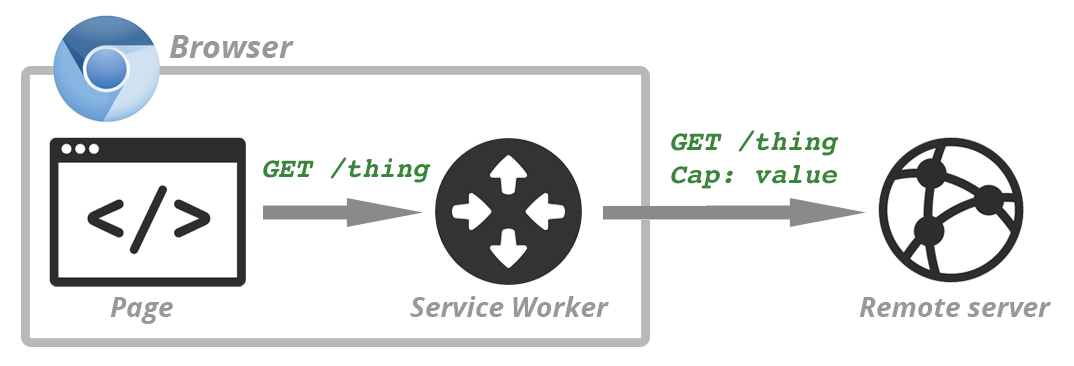
<p>A simple way to understand Service Worker is to think of it as a scriptable proxy that runs in your browser and is able to see, modify, and respond to, all requests initiated by the page it is installed on. As a result, the developer can use it to annotate outbound requests (via HTTP request headers, URL rewriting) with relevant capability advertisements:</p>

<ol>
<li>Developer defines what capabilities are reported and on which requests.</li>
<li>Capability checks are executed on the client - no guessing on the server.</li>
<li>Reported values are dynamic and able to reflect changes in user preference and runtime environment.</li>
</ol>


<p><strong>This is not a proposal or a wishlist, this is <a href="http://blog.chromium.org/2014/12/chrome-40-beta-powerful-offline-and.html">possible today</a>, and is a direct result of enabling powerful low-level primitives in the browser - hooray.</strong> As such, now it's only a question of establishing the best practices: what do we report, in what format, and how to we optimize interoperability? Let's consider a real-world example...</p>

<h2>E.g. optimizing video startup experience</h2>

<p>Our goal is to deliver the optimal &mdash; fast and visually pleasing &mdash; video startup experience to our users. Simply starting with the lowest bitrate is suboptimal: fast, but consistently poor visual quality for all users, even for those with a fast connection. Instead, we want to pick a starting bitrate that can deliver the best visual experience from the start, while minimizing playback delays and rebuffers. We don't need to be perfect, but we should account for the current network weather on the client. Once the video starts playing, the adaptive bitrate streaming will take over and adjust the stream quality up or down as necessary.</p>

<p>The combination of Service Worker and <a href="http://w3c.github.io/netinfo/">Network Information API</a> make this trivial to implement:</p>

<div class="highlight"><pre><code class="language-js" data-lang="js"><span class="c1">// register the service worker</span>
<span class="nx">navigator</span><span class="p">.</span><span class="nx">serviceWorker</span><span class="p">.</span><span class="nx">register</span><span class="p">(</span><span class="s1">&#39;/worker.js&#39;</span><span class="p">).</span><span class="nx">then</span><span class="p">(</span>
    <span class="kd">function</span><span class="p">(</span><span class="nx">reg</span><span class="p">)</span> <span class="p">{</span> <span class="nx">console</span><span class="p">.</span><span class="nx">log</span><span class="p">(</span><span class="s1">&#39;Installed successfully&#39;</span><span class="p">,</span> <span class="nx">reg</span><span class="p">)</span> <span class="p">},</span>
    <span class="kd">function</span><span class="p">(</span><span class="nx">err</span><span class="p">)</span> <span class="p">{</span> <span class="nx">console</span><span class="p">.</span><span class="nx">log</span><span class="p">(</span><span class="s1">&#39;Worker installation failed&#39;</span><span class="p">,</span> <span class="nx">err</span><span class="p">)</span> <span class="p">}</span>
<span class="p">);</span>

<span class="c1">// ... worker.js</span>
<span class="nx">self</span><span class="p">.</span><span class="nx">addEventListener</span><span class="p">(</span><span class="s1">&#39;fetch&#39;</span><span class="p">,</span> <span class="kd">function</span><span class="p">(</span><span class="nx">event</span><span class="p">)</span> <span class="p">{</span>
    <span class="kd">var</span> <span class="nx">requestURL</span> <span class="o">=</span> <span class="k">new</span> <span class="nx">URL</span><span class="p">(</span><span class="nx">event</span><span class="p">.</span><span class="nx">request</span><span class="p">);</span>

    <span class="c1">// Intercept same origin /video/* requests</span>
    <span class="k">if</span> <span class="p">(</span><span class="nx">requestURL</span><span class="p">.</span><span class="nx">origin</span> <span class="o">==</span> <span class="nx">location</span><span class="p">.</span><span class="nx">origin</span><span class="p">)</span> <span class="p">{</span>
        <span class="k">if</span> <span class="p">(</span><span class="sr">/^\/video\//</span><span class="p">.</span><span class="nx">test</span><span class="p">(</span><span class="nx">requestURL</span><span class="p">.</span><span class="nx">pathname</span><span class="p">))</span> <span class="p">{</span>
            <span class="c1">// append the MD header, set value to NetInfo&#39;s downlinkMax:</span>
            <span class="c1">// http://w3c.github.io/netinfo/#downlinkmax-attribute</span>
            <span class="nx">event</span><span class="p">.</span><span class="nx">respondWith</span><span class="p">(</span>
                <span class="nx">fetch</span><span class="p">(</span><span class="nx">event</span><span class="p">.</span><span class="nx">request</span><span class="p">.</span><span class="nx">url</span><span class="p">,</span> <span class="p">{</span>
                    <span class="nx">headers</span><span class="o">:</span> <span class="p">{</span> <span class="s1">&#39;MD&#39;</span><span class="o">:</span> <span class="nx">navigator</span><span class="p">.</span><span class="nx">connection</span><span class="p">.</span><span class="nx">downlinkMax</span> <span class="p">}</span>
                <span class="p">})</span>
            <span class="p">);</span>
            <span class="k">return</span><span class="p">;</span>
        <span class="p">}</span>
    <span class="p">}</span>
<span class="p">});</span></code></pre></div>


<ol>
<li>Site installs a Service Worker script that is scoped to capture <code>/video/*</code> requests.</li>
<li>When a video request is intercepted, the worker appends the <a href="http://igrigorik.github.io/http-client-hints/#rfc.section.5">MD header</a> and sets its value to the current <a href="http://w3c.github.io/netinfo/#downlinkmax-attribute">maximum downlink speed</a>. Note: current plan is to enable <code>downlinkMax</code> in Chrome 41.</li>
<li>Server receives the video request, consults the advertised <code>MD</code> value to determine the starting bitrate, and responds with the appropriate video chunk.</li>
</ol>


<p>We have full control over the request flow and are able to add additional data to the request prior to dispatching it to the server. Best of all, this logic is transparent to the application, and you are free to customize it further. For example, want to add an explicit user override to set a starting bitrate? Prompt the user, send the value to the worker, and have it annotate requests with whatever value you feel is optimal.</p>

<div class="callout">
Tired of writing out srcset rules for every image? Service Worker can help deliver DPR-aware &lt;img&gt;'s: use <a href="https://github.com/igrigorik/http-client-hints#delivering-dpr-aware-images">content negotiation</a>, or <a href="https://github.com/agektmr/responsive-resource-loader">rewrite the image URL's</a>. Note that device DPR is a dynamic value: zooming on desktop browsers affects the DPR value! Existing device detection methods cannot account for that.
</div>


<h2>Implementation best practices</h2>

<p>Service Worker enables us (web developers) to define, customize, and deploy new capability reports at will: we can rewrite requests, implement content-type or origin specific rules, account for user preferences, and <a href="http://jakearchibald.com/2014/offline-cookbook/">more</a>. The new open questions are: what capabilities do our servers need to know about, and what's the best way to deliver them?</p>

<p>It will be tempting to report every plausibly useful property about a client. Please think twice before doing this, as it can add significant overhead to each request - be judicious. Similarly, it makes sense to optimize for interoperability: use parameter names and format that works well with existing infrastructure and services - caches and CDN's, optimization services, and so on. For example, the <code>MD</code> and <code>DPR</code> request headers used in above examples <a href="https://github.com/igrigorik/http-client-hints#http-client-hints-internet-draft">come from Client-Hints</a>, the goals for which are:</p>

<ul>
<li>To document the best practices for communicating client capabilities via HTTP request header fields.</li>
<li>Acts as a registry for common header fields to help interoperability between different services.

<ul>
<li><em>e.g. you can already use <code>DPR</code> and <code>RW</code> hints to optimize images with <a href="https://github.com/igrigorik/http-client-hints#hands-on-example">resrc.it service</a>.</em></li>
</ul>
</li>
</ul>


<p>Now is the time to experiment. There will be missteps and poor initial implementations, but good patterns and best practices will emerge. Most importantly, the learning cycle for testing and improving this infrastructure is now firmly in the hands of web developers: deploy Service Worker, experiment, learn, and iterate.</p>
]]></content>
 </entry>


</feed>